THE PROBLEM
Where the friction starts.
A current-looking location can outlive the observation that produced it. Device names can collide, a source can stop rendering, and a successful collection attempt does not necessarily mean a device has a fresh fix. A household tool needs to show those distinctions clearly.
THE APPROACH
A system around the task.
LocateLog’s current native-reader path uses the macOS accessibility surface of Find My, then parses observations into an explicit presence model. A local history layer and generated dashboard make the observed state available without turning uncertain readings into confident claims.
- Native observations
- Parse + match
- Freshness + history
- Household dashboard
WHAT WAS BUILT
The choices that make it work.
Match the right source
Owner-and-device matching, source selection, and per-device reporting keep similarly named or retired devices from being treated as interchangeable.
Separate freshness from collection
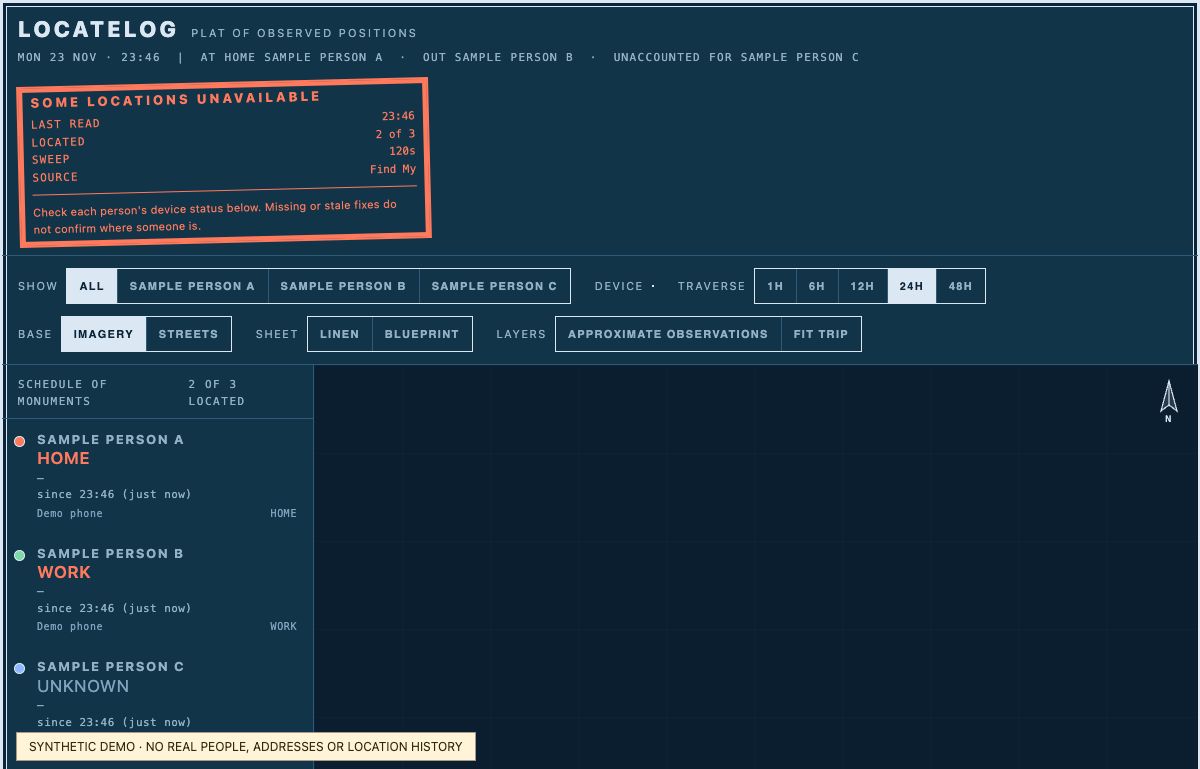
Source-reported location time, collector health, unavailable devices, paused readings, and last-known observations remain distinct. A stale dashboard can warn that current whereabouts cannot be confirmed.
Keep history inspectable
Append-only observations, place transitions, bounded validation evidence, and atomic dashboard generation preserve context while avoiding partial page writes. The interface labels approximate geometry and uncertain gaps.
CURRENT STATE
Working evidence. Clear boundaries.
The available source includes the Swift reader, Python parsing and history modules, health contracts, dashboard renderer, and recovery tests. The screenshot uses that renderer with fictional people and place labels; no real location history was accessed for the visual.
A device observation does not prove a person’s whereabouts. The native collector depends on a logged-in graphical Mac session, Find My rendering, and appropriate system permissions. The portfolio capture does not run the household collector.
Source and capture notes
Current locator README, Swift/Python source, dashboard renderer, and health/freshness regression contracts. Earlier browser-collector notes were treated as historical.
Reviewed November 23, 2026. Visuals are captured from source applications or their original renderers in isolated previews. Synthetic content is demonstration data, not a project outcome metric.